

Scenario:
As a professional poker player you have won the WSOP (World Series of Poker) and now your financial problems are over you decide to start your own online poker room. The bluffing is over it’s time to configure your own company network…you have setup your own AS (100) and are connected to a service provider who is using AS 300. You are connecting your network to another big online poker website to exchange network information but you are using EIGRP instead of BGP to connect AS 100 and 200…the problem you face is that traffic from your AS towards AS 200 is being sent towards AS300 and not using the direct link between router Diamonds and Spades.
Goal:
- All IP addresses have been preconfigured for you.
- All routers have a loopback interface:
Router Diamonds: L0: 1.1.1.1 /24
Router Spades: L0: 2.2.2.2 /24
Router Hearts: L0: 3.3.3.3 /24
Router Clubs: L0: 4.4.4.4 /24 - Configure EBGP between AS 100 and AS 300.
- Router Diamonds: Advertise the 1.1.1.0 /24 network in BGP.
- Configure IBGP on router Hearts and Clubs.
- Configure EBGP between AS 200 and AS 300.
- Router Diamonds: advertise the 1.1.1.0 /24 network in BGP.
- Router Spades: advertise the 2.2.2.0 /24 network in BGP.
- Ensure you can ping 2.2.2.2 from router Diamonds.
- Ensure you can ping 1.1.1.1 from router Spades.
- If you have any connectivity problems fix them by using next-hop-self or advertising the appropriate networks in BGP. Do not advertise the 192.168.12.X /24 network in any way.
- Configure EIGRP between router Diamonds and Spades:
Advertise the 192.168.12.0 /24 network.
Advertise the 1.1.1.0 /24 network.
Advertise the 2.2.2.0 /24 network.
Disable auto-summary - Ensure you have an EIGRP neighbor relationship between the 2 routers.
- Do a traceroute from router Spades to 1.1.1.1, which path is it taking?
- Use a BGP command to make sure that traffic from router Spades towards 1.1.1.1 is using the 192.168.12.X link and is not being sent through AS 300.
- When the link between router Diamonds and Spades fails it should use AS 300 to reach the 1.1.1.0 /24 network.
It took me 1000s of hours reading books and doing labs, making mistakes over and over again until I mastered all the routing protocols for CCNP.
Would you like to be a master of routing too? In a short time without having to read 900 page books or google the answers to your questions and browsing through forums?
I collected all my knowledge and created a single ebook for you that has everything you need to know to become a master of routing.
You will learn all the secrets about BGP, administrative distance and more.
Does this sound interesting to you? Take a look here and let me show you how to Master CCNP ROUTE
IOS:
c3640-jk9s-mz.124-16.bin
Topology:
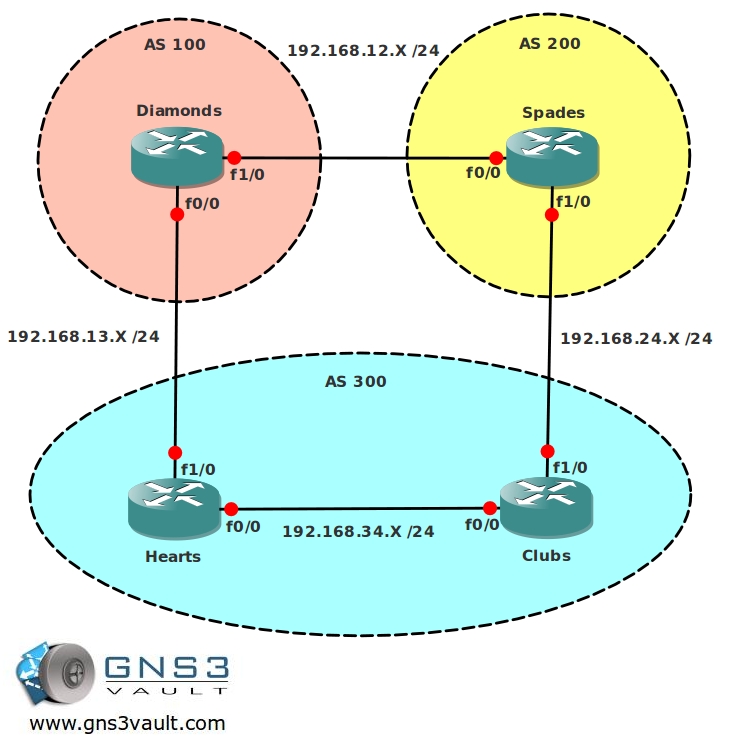
Video Solution:
Configuration Files
You need to register to download the GNS3 topology file. (Registration is free!)Once you are logged in you will find the configuration files right here.

The How to Master series helps you to understand complex topics like spanning-tree, VLANs, trunks, OSPF, EIGRP, BGP and more.
Written by René Molenaar - CCIE #41726


This .net file needs the .1 or .2 or .whatever last octet of the ip 🙂
I need to fix the startup configs for this one…coming soon 😉
Hi Rene,
You mentioned about fixing the startup configs for this lab? Is this lab ready to be used?
Thanks
I just fixed the startup-config, no need to configure IP addresses anymore……ready to rock!
have fun! 8)
Never knew about bgp backdoor before. Nice tutorial. Thanks very much.
Hi, there is only final configs available. Where is startup lab files?
You are right, there was no startup config. Just added it.
Rene
the configs are not working here!
disregard i got it. i can see the config now
HI Rene,
I need the .net file. this file isnt in the .zip folder. Thanks.
Nurul
Thanks Nurul, I just fixed it!
just tried your setup and i’m seeing the interfaces on router R1 (Diamonds) are switched. Fa1/0 has the 13 subnet while according to the picture (and the .net file) should be the 12 subnet.
Both the starting config as the final one.
Thanks you are right, I just fixed it.
I solved the problem in a way that I changed the administrative distance of BGP in 100 on router SPADES.
Can it be done on that way or it have some other problems??
That sounds fine, the router will prefer the EIGRP route then.
if it prefers EIGRP Physical interface (fa0/0)is down so router Spade or Diamond will point the routes towards fa0/0 so wont it drop there? if im right changing AD value will not use the function like Backdoor if the physical link is down. please correct if im wrong 🙂
Hi Rene,
Nice labs, great job. I have noticed that in this lab the link for downloading the final configurations is not working properly. It downloads the startup configurations instead … 🙂 Am I right?
Thanks
Regards,
Mauro is correct – the final configuration link actually points to the startup configs.
i found it interesting that the BGP “backdoor” switch requires you to use a BGP “network” statement for a subnet the local router is NOT originating.
good stuff 🙂
There is no final configuration .
Just fixed it.