

Scenario:
You are one of the trainees at a fairly small ISP. Your boss is on vacation and all colleagues are out of the office troubleshooting problems at customers. You receive a phonecall of one of the network engineers in NewDelhi who complains you are sending all traffic meant for Paris through his network and he wants it solved in the next 10 minutes. You google a bit for BGP attributes but it isn’t making sense much to you at this moment…you do read something about Router ID so maybe that’ll be helpful to you…ignorance is bliss right? Let’s go!
Goal:
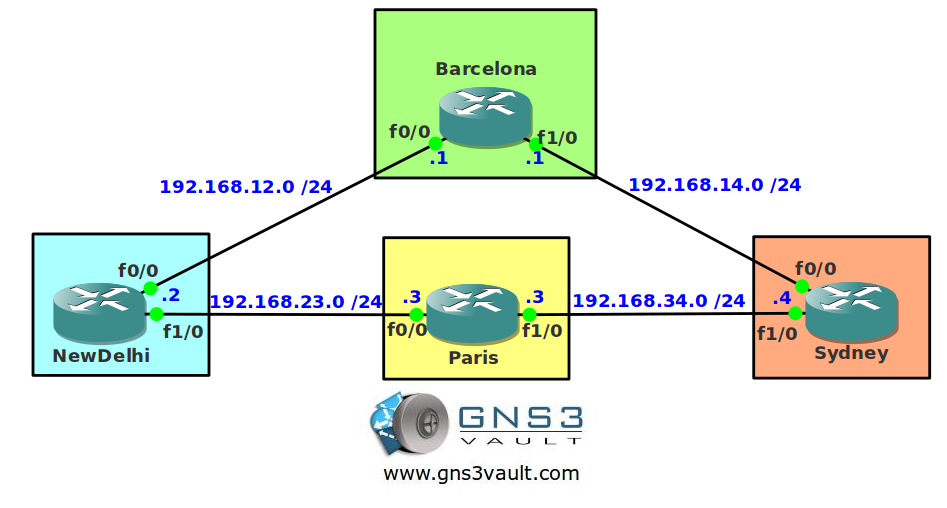
- All IP addresses have been preconfigured for you as specified in the topology picture.
- Configure EBGP between all ASes.
- Advertise the loopback0 interface on router Barcelona in BGP.
- Router Paris should have two paths to reach network 1.1.1.0 /24.
- Ensure router Paris sends traffic to router Sydney to reach network 1.1.1.0 /24. You are only allowed to make changes on router Sydney.
It took me 1000s of hours reading books and doing labs, making mistakes over and over again until I mastered all the routing protocols for CCNP.
Would you like to be a master of routing too? In a short time without having to read 900 page books or google the answers to your questions and browsing through forums?
I collected all my knowledge and created a single ebook for you that has everything you need to know to become a master of routing.
You will learn all the secrets about BGP, router ID, attributes and more.
Does this sound interesting to you? Take a look here and let me show you how to Master CCNP ROUTE
IOS:
c3640-jk9o3s-mz.124-16.bin
Topology:
Video Solution:
Configuration Files
You need to register to download the GNS3 topology file. (Registration is free!)Once you are logged in you will find the configuration files right here.

The How to Master series helps you to understand complex topics like spanning-tree, VLANs, trunks, OSPF, EIGRP, BGP and more.
Written by René Molenaar - CCIE #41726


Hi,
Thanks for the lab. Even after i changed the router-id at Sydeny, the route for 1.1.1.0 is still preferred through Newdelhi. Could anyone please tell me the reason please.
Hi Marshall,
Do you see both paths in the routing table of router Paris? Did you change anything else that could influence the BGP routing decision?
W Weight (Highest)
L Local_Pref (Highest)
O Originate (local originate)
AS As_Path (shortest)
O Origin Code (IGP < EGP < Incomplete) M MED (lowest) P Paths (External Paths preferred Over Internal) R Router ID (lowest) Also keep in mind that if you change the router ID...do a BGP neighbor reset just to make sure. Next week I'm back to recording videos, I'll do this one as well!
Hi Everyone,
There’s something else you need to know if you do this lab or watch my video.
Between the “Paths” and “Router ID” attribute there is something else that will determine which route will be used:
1. Prefer the path with the [b]minimum IGP metric[/b] to reach the next hop IP address.
2. Prefer the prefix with the [b]longest uptime[/b], this is done to prevent route flapping.
So in order to have the Router ID as the tie-breaker both prefixes have to be equally long in the BGP table. Otherwise it will prefer one over the other.
Thanks to Diesel for this tip!
Rene
The router-ID attribute is working “properly” only in combination with the command:
“bgp bestpath compare-routerid” under BGP config.
If you shutdown the BGP between Paris-Sydney and enable it again, the Paris router will not converge to Sydney path even it has a lower router-ID.
But if you add the command above it will converge always to the lower router-ID.
i did a soft reset initially, but Paris was still choosing the New Delhi – Barcelona path.
had to read through Cisco’s BGP Path Selection PDF to find my answer – oldest route is before router ID in the algorithm:
http://www.cisco.com/c/en/us/support/docs/ip/border-gateway-protocol-bgp/13753-25.html
when i hard cleared the adjacency on Paris, all was good as Paris then chose the Sydney – Barcelona path.
this was outside the scope of this lab, but i configured “bgp bestpath compare-router-id” on Paris. i then hard cleared the BGP session on Sydney so New Delhi would have the oldest path, more preferred path.
before configuring “bgp bestpath compare-router-id” on Paris, Paris would prefer the New Delhi path because it would be older after resetting the Sydney BGP adjacencies.
but, with “bgp bestpath compare-router-id” configured on Paris, the newer Sydney path preempts the older New Delhi path because of the BGP router-id attribute.
the devil is in the details 🙂
another awesome lab.